Karpathy on Dec 25, 2025 on X:
I’ve never felt this much behind as a programmer. The profession is being dramatically refactored as the bits contributed by the programmer are increasingly sparse and between. I have a sense that I could be 10X more powerful if I just properly string together what has become available over the last ~year and a failure to claim the boost feels decidedly like skill issue. There’s a new programmable layer of abstraction to master (in addition to the usual layers below) involving agents, subagents, their prompts, contexts, memory, modes, permissions, tools, plugins, skills, hooks, MCP, LSP, slash commands, workflows, IDE integrations, and a need to build an all-encompassing mental model for strengths and pitfalls of fundamentally stochastic, fallible, unintelligible and changing entities suddenly intermingled with what used to be good old fashioned engineering. Clearly some powerful alien tool was handed around except it comes with no manual and everyone has to figure out how to hold it and operate it, while the resulting magnitude 9 earthquake is rocking the profession. Roll up your sleeves to not fall behind.
The above appears to be influenced by Claude Opus 4.5 release. Some of the hype around “new layer of abstraction” might be a bit hyped, but there is something to consider about the hype, and see what can be taken away from that.
Claude Code was created by Boris Cherny in Sep 2024.
AI Coding Review Tools
Plannotator - Plan & Code Review for AI Coding Agents — GitHub - backnotprop/plannotator: Annotate and review coding agent plans and code diffs visually, share with your team, send feedback to agents with one click. · GitHub
AI Coding Tools
Droid CLI “Run a real agent session from your terminal. Droid plans, edits, executes tools, streams results, and keeps the approval model visible.” From this thread — Best tools for AImaxing
OpenCode is an open source agent that helps you write code in your terminal, IDE, or desktop.
Toad is a unified experience for AI in the terminal for AI tools such as OpenHands, Claude Code, Gemini CLI, and many more. All of which run seamlessly under a single terminal UI, thanks to the ACP protocol.
Factory.AI an AI-native software development platform that works everywhere you do. From IDE to CI/CD - delegate complete tasks like refactors, incident response, and migrations to Droids without changing your tools, models, or workflow.
Brokk is very different than the typical VSCode based AI Coding agents like cursor etc. See Brokk: AI for Large (Java) Codebases.
Coding with local-llm
- Benchmarking Local LLMs Against Coding Agent Harnesses by Dr Pasquale Minervini; WIP (Jun 2026).
Doing AI Coding well
First attempt will be 95% garbage: A staff engineer’s 6-week journey with Claude Code — by Vincent Quigley. Spoiler: it’s running multiple agents like a small team with daily amnesia.
Parallel AI Agents Are a Game Changer — by Igor Šarčević
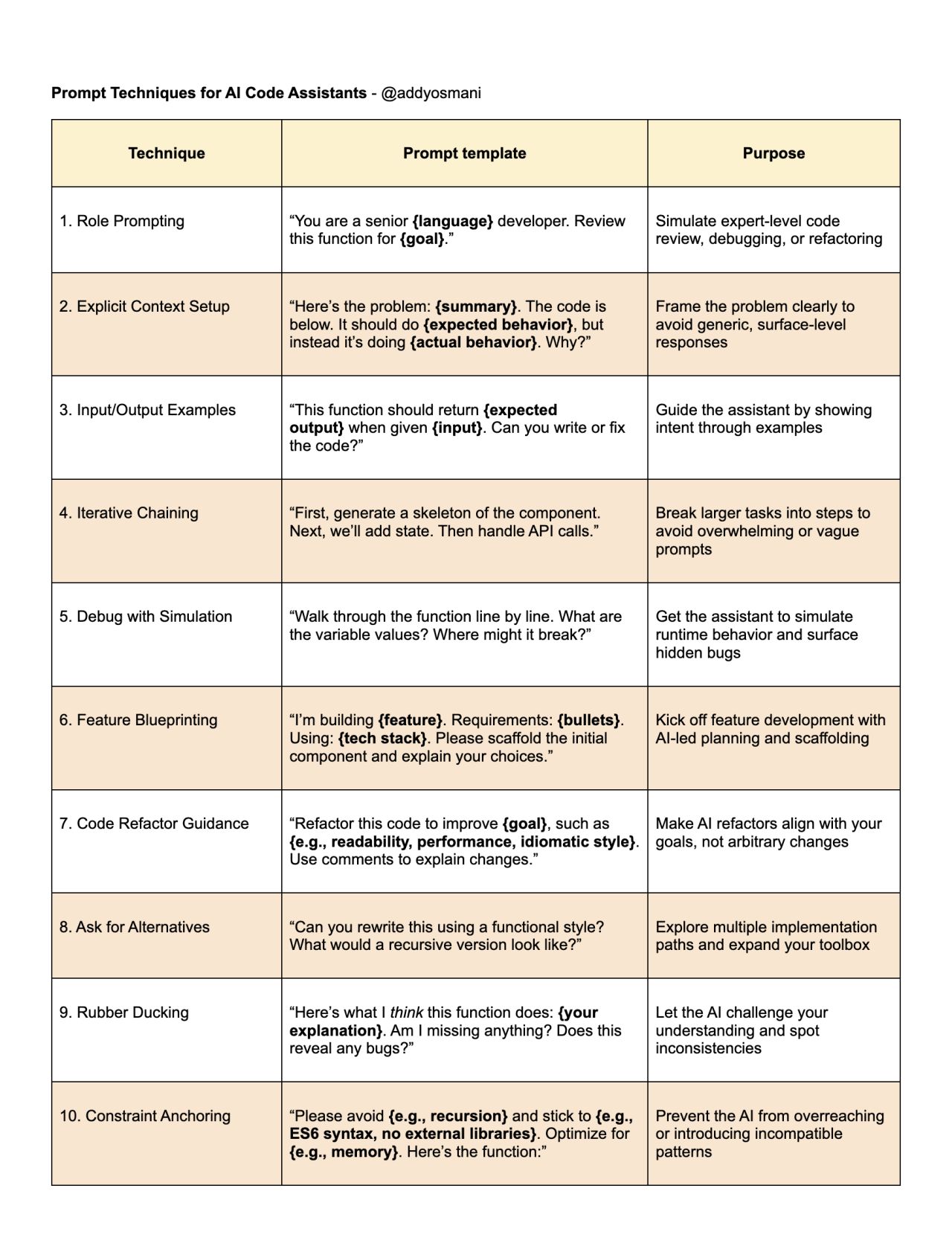
Prompt Techniques for AI Code Assistants - @addyosmani
| Technique | Prompt Template | Purpose |
|---|---|---|
| 1. Role Prompting | “You are a senior {language} developer. Review this function for {goal}.” | Simulate expert-level code review, debugging, or refactoring |
| 2. Explicit Context Setup | “Here’s the problem: {summary}. The code is below. It should do {expected behavior}, but instead it’s doing {actual behavior}. Why?” | Frame the problem clearly to avoid generic, surface-level responses |
| 3. Input/Output Examples | “This function should return {expected output} when given {input}. Can you write or fix the code?” | Guide the assistant by showing intent through examples |
| 4. Iterative Chaining | “First, generate a skeleton of the component. Next, we’ll add state. Then handle API calls.” | Break larger tasks into steps to avoid overwhelming or vague prompts |
| 5. Debug with Simulation | “Walk through the function line by line. What are the variable values? Where might it break?” | Get the assistant to simulate runtime behavior and surface hidden bugs |
| 6. Feature Blueprinting | “I’m building {feature}. Requirements: {bullets}. Using: {tech stack}. Please scaffold the initial component and explain your choices.” | Kick off feature development with AI-led planning and scaffolding |
| 7. Code Refactor Guidance | “Refactor this code to improve {goal}, such as {e.g., readability, performance, idiomatic style}. Use comments to explain changes.” | Make AI refactors align with your goals, not arbitrary changes |
| 8. Ask for Alternatives | “Can you rewrite this using a functional style? What would a recursive version look like?” | Explore multiple implementation paths and expand your toolbox |
| 9. Rubber Ducking | “Here’s what I think this function does: {your explanation}. Am I missing anything? Does this reveal any bugs?” | Let the AI challenge your understanding and spot inconsistencies |
| 10. Constraint Anchoring | “Please avoid {e.g., recursion} and stick to {e.g., ES6 syntax, no external libraries}. Optimize for {e.g., memory}. Here’s the function:” | Prevent the AI from overreaching or introducing incompatible patterns |
Understanding code with the help of AI
CodeBoarding “Helping teams visualize, scale, and collaborate across complex codebases. CodeBoarding transforms complex codebases into clear, visual maps — across every level of abstraction.”